
.svg)
What It’s Like Working with a Printing Partner: Where Craftsmanship Meets Care
Discover the difference between a printer and a true printing partner. Learn how PrintsWell supports stationers with craftsmanship, care, and quality.
When it comes to working with a printing partner, there’s always a slight learning curve involved. Knowing what some of these terms are (like bleed vs trim vs safe area in printing) will help you as you upload and print your stationery. The good news? Most of these terms are used universally, from printer to printer.
When you upload your stationery designs to a printing fulfillment partner, you’ll find that they won’t let you submit your file OR you’ll learn the hard way: that your prints come back completely wrong. Money lost, tears shed, and frustrations abound. We want to help you avoid that as much as possible. So today, we’re diving into bleed, trim, and safe areas.
What is Bleed?
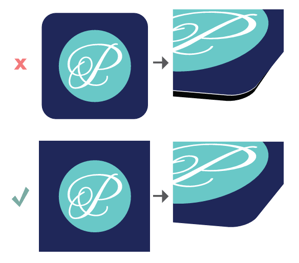
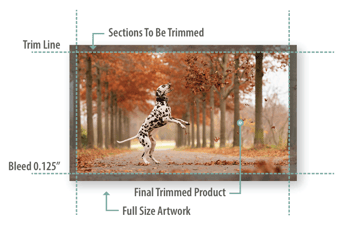
The bleed is the extra area on your file past the approximate trim line to accommodate any design element that extends or "bleeds" to the edge of the final product.This ensures that there’s no white lines on the edges of your file once printed and cut. At PrintsWell, we require designs to have a 0.125” bleed on each side of your print file to make sure everything comes out perfectly. Bleeds are not necessary when all artwork or printing stays at least 0.125 away from the trim line. Even if your design doesn’t require bleed, including the bleed area on all files is a simple and reliable rule of thumb. It helps prevent issues if your design changes later.
Why Do Printers Require Bleed?
Printers require the bleed area to ensure that your prints come out perfectly and consistently with each print. During production, stacks of paper are cut down to their final size. Even with precise equipment, slight movement can occur when trimming. Bleed gives your design a buffer so that if this happens, your artwork still extends fully to the edge and remains visually centered, preventing unwanted white borders in the final product. Because of the possibility of a shift, we and many other printers have a shift allowance or shift tolerance. Industry standard is 0.125" while our allowance is just half of that at 0.0625''.
What is A Trim Line?
The trim line is the line on which your print file will be trimmed and cut to size. Usually, you’ll design your stationery with bleed to make sure you don’t see any white space. The trim line is extremely important to note because any designs, imagery, or text that goes beyond this line will be cut down after the print process.
What Are Safe Areas?
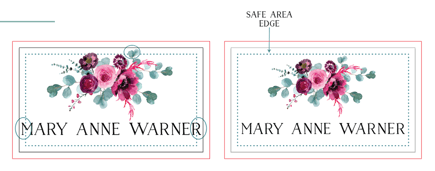
Safe areas on your prints are 0.125 inches away from the edge of the trim line or 0.25 inches away from the bleed edge of your file. Anything outside of the safe area (or margin) is at risk of being trimmed off the final product or print. You always want to triple, or even quadruple check that all your artwork is within the designated safe areas.
Common File Mistakes
Choosing to work with a printing partner for your business can often feel risky. When you entrust your business to a printer, you’re trusting that they’re going to treat each order like you would - with painstaking attention to detail.
One of the hardest parts about outsourcing your fulfillment is when the printing doesn’t go exactly the way you wanted or hoped it would. When you’re printing from home, it can be a lot easier to catch simple mistakes and stop the print. But when you’re printing in larger quantities and don’t catch the issues until it’s too late, those mistakes can be costly.
Here are some common printing file mistakes we often see. Knowing these and how to avoid them will help set you up for success when you submit your own projects:
1. Not checking the safe areas.
2. Forgetting to design your projects with bleed.
3. Having text or art too close to the trim lines.
4. Sending your projects without checking them for errors.
5. Not designing your projects with production in mind.
At PrintsWell, we do our best to provide our stationers with all the education they need up front before they ever click “submit” on a new print project. Those butterflies of nervousness you feel when you print with a vendor will eventually fade away as you get the hang of what bleed, trim, and safe zones are on your projects. This helpful guide will share exactly what you need to know when you’re designing your projects with production in mind. And if you’re wondering what print-ready means, check out this article here too.
When you choose to partner with us, you’re choosing a real partner. Not just someone who’s going to print an order for you. Because of that, we make sure to walk with you each step of the way until you’re fully confident in the printing process from start to finish.
Work With A Printing Partner, Not Just A Vendor
Ready to work with a printing partner that truly cares about your business? Someone who wants to help you understand bleed vs trim vs safe areas? We understand what it feels like to put a project in the hands of another vendor…only to be disappointed on the other side. That’s why we’ve come up with The PrintsWell Standard. It’s our promise to you that when you print with us, you can expect quality, consistency, and incredible customer service with every single order. We truly believe you deserve the best.
Discover the difference between a printer and a true printing partner. Learn how PrintsWell supports stationers with craftsmanship, care, and quality.
Today, we are diving into the world of print, exploring what print-ready means, and sharing a checklist that will help you gain confidence as you...
Discover the story of PrintsWell, a family-owned stationery printer founded in 1970.